Download Your Free Trial!
Evaluate Media Detective For 14 Days - FREE
Download Instructions |
Step 1:Click this button to download your Media Detective trial software.Download Media Detective Trial |
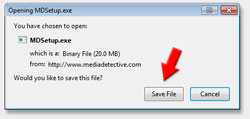
Step 2:Click the Save File button and wait for the file to finish downloading.
|
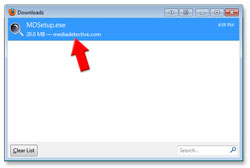
Step 3:Double-click the Media Detective icon in the Downloads dialog, to install.
|
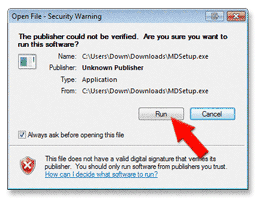
Step 4:If a warning appears, you may safely acknowledge it by pressing Run.
|
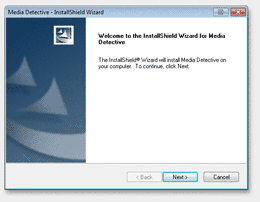
Step 5:Follow the instructions in the setup wizard to install the software on your computer.
|
Download Instructions |
Step 1:Click this button to download your Media Detective trial software.Download Media Detective Trial |
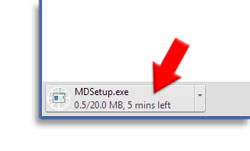
Step 2:The download will start automatically. A progress marker will appear in the bottom left of your browser window. Wait for it to finish.
|
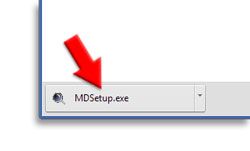
Step 3:When the file has finished downloading, click the button. The software will start installing.
|
Step 4:Follow the instructions in the setup wizard to install the software on your computer.
|
Download Instructions |
Step 1:Click here to download Media DetectiveDownload Media Detective Trial |
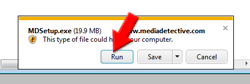
Step 2:Click the Run button at the bottom of the browser.
|
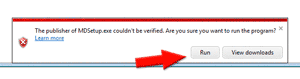
Step 3:Wait for the download to finish. If a warning appears, you may safely acknowledge it by pressing Run.
|
Step 4:Follow the instructions in the setup wizard to install the software on your computer.
|
Downloading FAQ's
Do I need a credit card to try Media Detective?
The Media Detective trial is free and no credit card is required. You are welcome to try the software for 14 days at no risk. There is no obligation to purchase at any time.
How long is the free trial?
The Media Detective trial operates for 14 days. If you choose to order the software after that time, you can do so online. If you do not wish to purchase you can easily uninstall the software, there is nothing to pay.
What if I encounter a problem with the trial?
The first stop is the FAQ section where you can find solutions to common problems. If your question is not answered there then you may contact us for personalized support.
Is it a one time purchase or an ongoing subscription?
Media Detective is sold as a once-off purchase. There are no further fees or costs. Once you purchase the software you are entitled to use that version forever. For future major releases, you may choose to upgrade at your discretion, but this is not required.